
Infovion JMS
Jewellery software with Tally export
Bill in JMS through the month. At month end, download two TallyPrime files and your accountant imports every sale, receipt, old gold purchase and girvi entry, under the ledger names they already use.
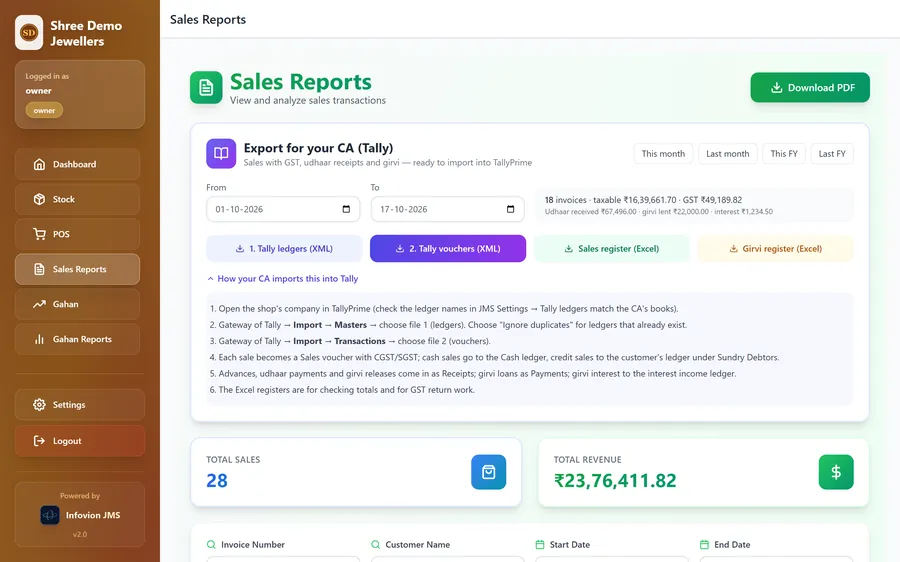
How does jewellery software send data to Tally?
Most jewellery software sends data to Tally as XML files that TallyPrime imports. Infovion JMS creates two files for any period: first the masters (ledgers for customers, sales, tax, cash, bank, old gold and girvi), then the vouchers (sales with GST or VAT, receipts, old gold taken in exchange as a journal, girvi loans given as payments, and girvi interest and repayments as receipts). The accountant imports the masters, then the transactions, from Gateway of Tally → Import. Ledger names are set in JMS to match the accountant's books.
What goes into Tally
- Sales vouchers: taxable value after discount, CGST and SGST or IGST (or VAT), and round off
- Receipts taken at billing, by cash or bank
- Old gold taken in exchange, as a journal entry
- Udhaar payments from customers, including opening dues
- Girvi loans given, as payments
- Girvi interest and principal repaid, as receipts
How the accountant imports it
- In JMS: Reports and exports → Tally, choose the period
- Download 1. Masters, then 2. Vouchers
- In TallyPrime: Gateway of Tally → Import → Masters, then Import → Transactions
- Voucher numbers follow the JMS invoice and girvi numbers
- Each voucher's narration lists the customer, items and weights, and any discount
Ledger names you can set
- Sales - Jewellery
- Output CGST, Output SGST, Output IGST or Output VAT
- Cash, Bank, Round Off
- Old Gold Purchase
- Girvi Loans Given, Interest on Girvi
- Tally company name
Also for the accountant
- Sales register for Excel with taxable value, tax, HSN and HUID
- Girvi and stock registers
- Full backup of the shop's data
- Finance add-on loans: Excel exports (not yet in the Tally files)
FAQ
Frequently asked questions
Does Infovion JMS work with Tally?
Yes. JMS exports TallyPrime XML: the ledgers (masters) and all vouchers for the period, covering sales with tax, receipts, old gold, udhaar payments, girvi loans, interest and repayments. The accountant imports them from Gateway of Tally → Import.
Does it work with Tally ERP 9?
The files are made for TallyPrime's XML import. If your accountant still uses Tally ERP 9, try a one-month import on a test company first.
Will the import create duplicate ledgers?
No, as long as the ledger names in JMS Settings → Tally match the accountant's existing ledgers. Set them once; every later export uses the same names. Customer ledgers are named with the customer's name and mobile number.
How often should I export to Tally?
Monthly is usual, before GST returns. Any date range can be exported, so a quarter or a full financial year also works. Import each period once.
Is it a live sync?
No. JMS creates files that the accountant imports, which also works when the accountant is in another town and has their own copy of Tally.
See Infovion JMS on a free demo call
We show it on a 15-minute call, in your language. ₹11,999 ₹9,999 per shop plus GST, then an AMC of ₹3,999 a year.