
Infovion JMS
Jewellery barcode software
Give every piece its own tag, bill it with a scan, and count the whole showroom by scanning. Works with the label printers and scanners jewellers already use.
How does barcode tagging work in a jewellery shop?
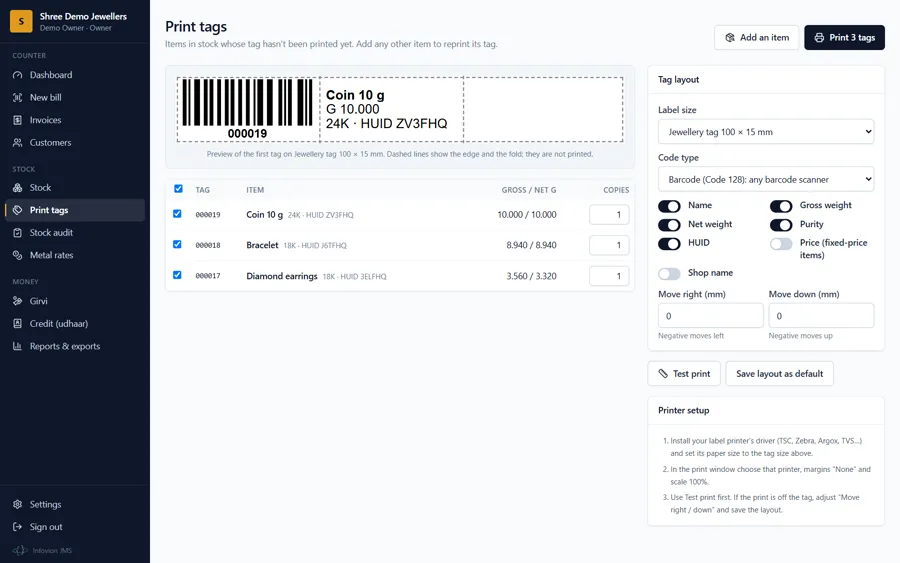
Each piece gets a unique tag number, printed as a barcode or QR code on a small jewellery tag together with its gross and net weight, purity and HUID. At the counter, scanning the tag adds the piece to the bill with its weight and the day's rate, which removes typing errors. Because every piece is tagged, the stock can be counted by scanning all tags: the software lists what is missing, what was already sold and any tag it does not know. Infovion JMS does all three: tagging, billing by scan and stock audit.
How it works in JMS
- Weigh a tray of new pieces and enter each piece's weights once; JMS numbers them
- Print the tags: barcode or QR, with weight, purity and HUID
- At billing, scan the tag; the piece is added with today's rate and can't be sold twice
- For a stock audit, scan every tag; JMS lists missing, sold and unknown tags
- Reprint any tag from the piece's page
Equipment that works
- Thermal tag printers through their own driver, e.g. TSC TE244, TVS, Zebra ZD230, Argox OS-214, Godex, Honeywell
- Jewellery tag rolls: 100 × 15, 100 × 13, 95 × 12 and 81 × 12 mm, or a custom size
- Stickers (50 × 25, 38 × 25 mm) and A4 label sheets on a normal printer
- USB or Bluetooth scanners: 1D for barcodes, 2D for QR codes
- Or a phone or tablet camera, from the Camera button
Printing without a driver
- Tags sent straight to the printer in TSPL (TSC, TVS, Argox, Xprinter, Gainscha, HPRT), ZPL or EPL (Zebra)
- Over a USB or Bluetooth COM port, USB on Android, Mac or Linux, Bluetooth Low Energy, or a saved .prn file
- Print head DPI, darkness, speed and gap set once per printer
- Alignment test and sample tag before a full roll
Tag layout controls
- Move the print right or down in millimetres
- Size correction when a driver shrinks the tag
- 1 to 4 labels across the roll
- Upside-down feed
- Layout saved as the default for every counter
Weighing scale
- Jewellery balances with RS-232 or USB output: Essae, Citizen, Atom, Contech, Shimadzu, A&D, Sartorius and others
- A Scale button beside every weight on stock, tagging and girvi forms
- Takes the first stable reading and converts mg, ct, kg, tola and oz to grams
- Works in Chrome or Edge on a computer
FAQ
Frequently asked questions
Which barcode type should a jewellery shop use?
Code 128 barcodes work with every barcode scanner and fit well on 100 × 15 mm tags. QR codes are smaller and can be read by 2D scanners and phone cameras, which suits very small tags. JMS prints either; the choice can be changed at any time.
Which tag printer should I buy?
Any thermal label printer with a Windows or macOS driver that handles narrow labels. Popular choices in India include the TSC TE244, Zebra ZD230 and Argox OS-214, typically with a resin or wax-resin ribbon for jewellery tags. Buy the tag rolls in the size you want to use and set the same size in the printer driver.
Do I need a special scanner?
No. Any USB or Bluetooth barcode scanner that types like a keyboard works: JMS recognises a scan anywhere on the billing and audit screens. A 2D scanner is needed for QR tags. A phone or tablet camera also works for occasional scans.
Can I keep my existing tag numbers?
Yes. When importing stock from a spreadsheet, keep your current tag numbers in the Tag number column and JMS uses them. New pieces get the next numbers automatically, with an optional prefix.
Does JMS support RFID?
Yes. A piece can carry its UHF RFID tag, or the tag can be encoded with the tag number. A stock audit reads a whole tray at once with an RFID reader, or loads a handheld's export file; barcode and QR tags work alongside.
My tag printer has no driver. Can JMS still print?
Yes. In Chrome or Edge, JMS can send tags straight to the printer in its own language: TSPL for TSC, TVS, Argox, Xprinter, Gainscha and HPRT, ZPL or EPL for Zebra. It connects over a USB or Bluetooth COM port, over USB on Android, Mac or Linux, or by Bluetooth Low Energy, and can also save a .prn file.
Can JMS read weights from my jewellery scale?
Yes. Scales with an RS-232 or USB output connect in Chrome or Edge on a computer. Press Scale beside a weight on the stock, tagging or girvi form and JMS fills in the first stable reading in grams.
See Infovion JMS on a free demo call
We show it on a 15-minute call, in your language. ₹11,999 ₹9,999 per shop plus GST, then an AMC of ₹3,999 a year.